Siri AI Deep Dive: Inside Apple's New AI Architecture

Published
Introduction
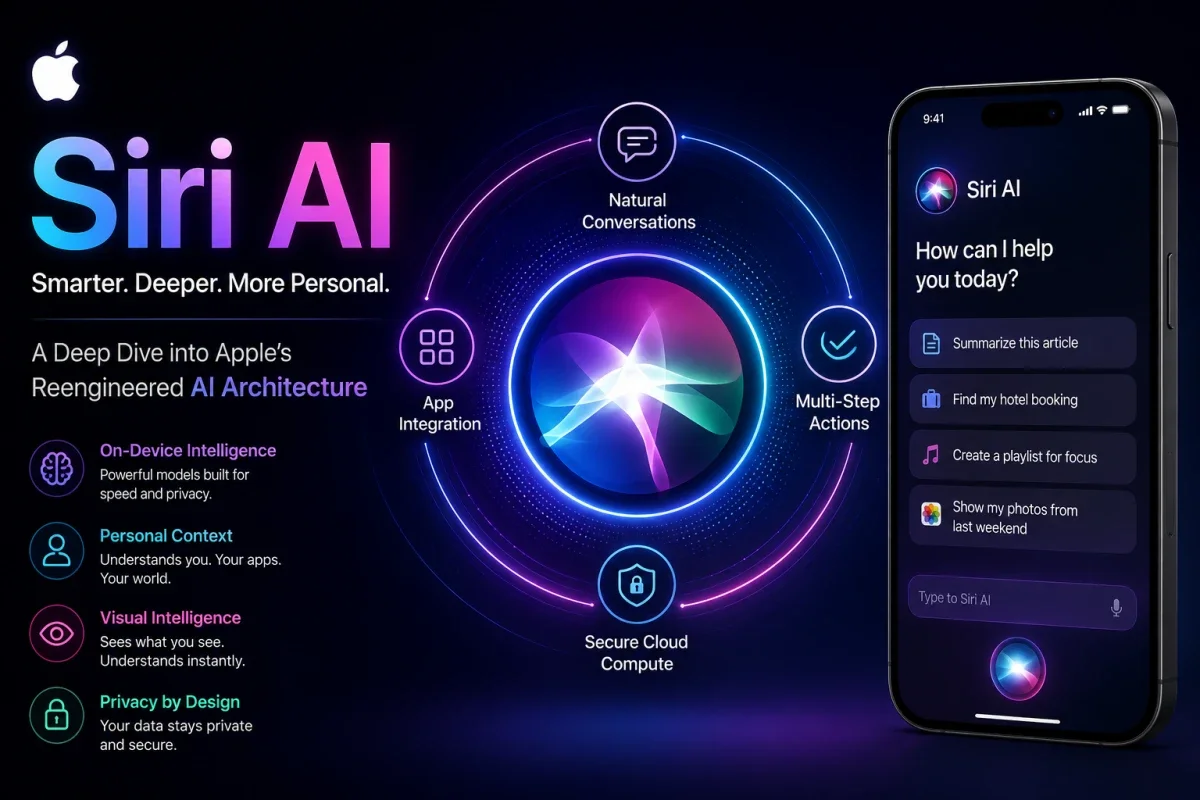
The recent opening keynote at the Worldwide Developers Conference introduced a fundamental reconstruction of Apple's digital assistant, officially branded as Siri AI. Moving past simple pattern matching and basic voice triggers, the platform introduces a local-first agentic framework deeply bound to core operating system storage layers.
The primary keyword for understanding this release is the execution of context-aware orchestration pipelines that preserve user anonymity while handling high-level reasoning tasks. This evaluation analyzes the underlying models, execution pipelines, multi-device sync topologies, and security boundaries powering the updated assistant.
Quick Facts: Siri AI Structural Breakdown
System Subcomponent | Technical Implementation | Operational Mandate |
Foundation Engine | Apple Foundation Models | Dual-mode on-device and server orchestration |
External Cloud Node | Google Gemini Technology | Complex web queries and deep reasoning tasks |
Interface State | Dynamic Island Application Layer | Volatile context caching and drop-down threads |
Context Pipeline | Rasterized Frame Buffer Parsing | Real-time on-screen optical and semantic tracking |
Security Layer | Private Cloud Compute Enclaves | Cryptographic isolation of off-device payload data |
The Machine Learning Foundation and Core Models
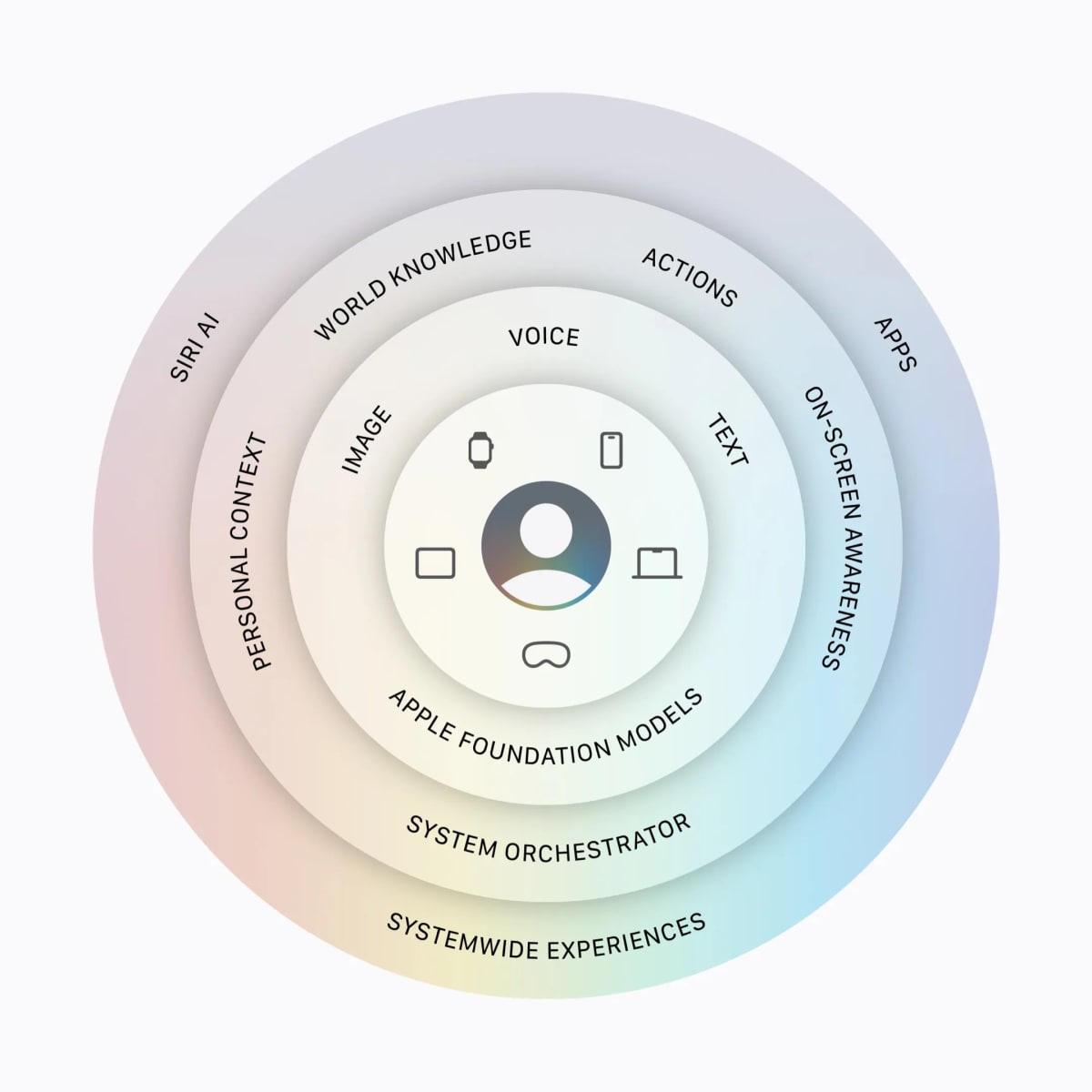
The deployment of Siri AI relies on a split-model strategy that separates localized consumer-grade processing loops from high-parameter remote server architectures. The fundamental brain of the assistant shifts to the next-generation Apple Foundation Models, which are specifically optimized for text manipulation, asset classification, and voice synthesis.
For broad world knowledge queries and intensive reasoning operations, the infrastructure routes structured requests outward to specialized systems trained on Google Gemini technology. This hybrid model layout ensures low-latency execution for daily actions while retaining access to vast public datasets.
Localized Parametric Scaling
The local model variant sits permanently inside dedicated storage blocks on the device volume, using specialized low-bit quantization methods to limit hardware overhead. The neural execution engine processes voice inputs locally, skipping external network round-trips for standard system commands.
The specialized chip architecture balances thermal boundaries while running real-time speech tokenization directly on the device. By restricting local model parameters to specialized task blocks, the operating system prevents battery degradation during long interactions.
The Unified Context Graph
To fuel the contextual processing engine, the system builds a localized vector database that maps the habits, communications, and files of the user. This data structure connects separate data fields from native applications into a single semantic tree.
The database continuously indexes text messages, calendar dates, email threads, and location logs to allow hyper-localized context matching. The assistant references this graph before every execution loop to clarify ambiguous pronouns or vague informational requests.
The Standalone Chat Interface and State Sync
For the first time since its initial release, the assistant transitions into a persistent system application featuring an explicit thread history view. The architecture moves away from temporary visual sheets that disappear once a user interacts with the display background.
Users can revisit past text interactions, review generated code snippets, or pick up older research sessions inside a dedicated chat interface. The application layout treats text and voice inputs as identical data streams within the conversation window.
The conversational history syncs across authorized consumer hardware using end-to-end encrypted cloud storage channels. A user can initialize a multi-step data query on an iPhone, walk over to a MacBook, and expand that exact conversation thread inside the desktop environment.
UI Mechanics and Dynamic Island Integration
The visual activation sequence on mobile hardware moves to the screen cutout zone, binding the assistant directly to the system status bar. Swiping downward on the interface boundary drops down an interactive terminal layer without shifting app focus.
Liquid Glass Overlay States
The background presentation layer uses updated translucent glass shaders that adjust transparency based on the contrast of underlying application assets. The rendering pipeline maps display pixels dynamically to keep text highly legible over bright or chaotic app backgrounds.
The compositing engine restricts resource consumption by rendering the blurred interface layers only during active animation states. Once the interface settles, the asset state freezes to free up graphic processing units for other applications.
Spatial Computing Implementations
On spatial hardware platforms, the assistant abandons flat windows entirely in favor of a three-dimensional visual asset that can float anywhere within the virtual room. Users trigger the system loop by focusing their gaze directly on the node and speaking.
The volumetric mesh tracking code processes gaze vectors in real time to prevent accidental activations from passing glances. The system opens an active audio capture window only when a user maintains an intentional focus lock on the visual element.
My POV: On the Dedicated Application Interface
Moving the assistant into a standalone application thread is a direct admission that voice-only interactions are insufficient for advanced reasoning tasks. Users requiring long-form text summaries or complex code changes cannot rely on ephemeral voice bubbles that vanish on a single mis-tap. By treating the assistant as a persistent application database, the operating system turns a simple voice command tool into a functional computing workspace.
On-Screen Awareness and Visual Intelligence
The most significant architectural update to the intake pipeline is the ability to read and parse the live display buffer in real time. This capability gives the assistant visual awareness of whatever application is currently drawing to the screen.
Rasterized Frame Parsing
When a user asks questions about on-screen data, the system securely mirrors the composited frame buffer directly into a local analysis pipeline. The subsystem runs optical character recognition routines to extract layout bounds and plain text strings.
The pipeline detects data blocks like addresses, tracking numbers, or pricing figures without needing explicit developer accessibility hooks inside the target application. The text data converts into structured payload inputs for immediate model evaluation.
Desktop Cross-Section Targeting
On desktop platforms, the visual intelligence layer activates via dedicated system keyboard configurations that allow targeted section mapping. Users can drag bounding boxes over code blocks, layout files, or dense schematics to pipe that asset data to the model.
The targeted approach cuts down model processing overhead by ignoring background screen space and focus-killing window wrappers. The model evaluates only the selected pixel data, speeding up response times for large asset analysis.
Multi-Step Command Chaining and Action Engines
The natural language processing engine can break down a compound sentence into an explicit checklist of independent application tasks. The orchestrator maps the user's intent to specific system API commands across separate native utilities.
Dependency Sorting Algorithms
The execution engine processes user strings through an on-device compiler that identifies individual target actions and their prerequisites. The system orders these tasks to ensure that data flows sequentially between separate database managers.
If a user requests a file search, an image transformation, and a text message transmission in one line, the system schedules the file lookup first. The output of the file lookup passes directly to the media conversion system before initializing the communication wrapper.
Systemwide App Actions
The application action layer hooks directly into core operating system schemas to manipulate local storage files without needing manual user navigation. The assistant can execute deletions, move assets, rewrite text blocks, or configure alarm trees.
The execution boundary prevents third-party apps from reading outside their designated sandboxes during these automated actions. The operating system monitors each mutation step to ensure data integrity remains constant across the local file index.
Writing Tools and Spatial Document Modification
The system incorporates inline textual manipulation features that function across any standard input field in the operating system environment. The writing engine overrides default text selection layers to allow direct document modification.
Inline Draft Synthesis
Users can describe a target document style or provide raw structural details directly into empty text areas to initialize content creation loops. The model analyzes nearby field descriptors to match the tone and layout of the surrounding document.
The system streams the generated text directly into the active application focus node to eliminate copy-paste steps. The input driver monitors system limits to ensure generated content matches maximum length constraints.
Contextual Revision Subsystems
The transformation engine reads selected text blocks and modifies them based on natural language feedback loops from the user. A person can highlight an informal email draft and command the assistant to adjust the professional tone or fix grammar.
The software calculates text differences locally, modifying only the phrases that require adjustments to preserve the broader formatting of the original document. This targeted modification process preserves manual layout work like bullet lists and bold headers.
My POV: On the Security of Frame Buffer Access
Letting a background process read the rasterized display buffer creates a highly sensitive security vector that demands strict operating system boundaries. If an exploit allows an attacker to intercept this frame pipeline, personal bank details, private messages, and security tokens could be exposed. Apple must treat these visual intelligence channels with the same level of cryptographic isolation normally reserved for biometric authentication hardware.
Private Cloud Compute Architecture
When a reasoning task exceeds the processing limits of local silicon, data shifts out to external server farms without dropping the core security profile. This external processing framework relies on Private Cloud Compute technology.
Secure Enclave Cloud Isolation
The remote server infrastructure uses custom silicon nodes configured to act as stateless secure enclaves. When a data packet arrives at the data center, the hardware decrypts the payload entirely within volatile memory layers.
The system software image contains no persistent logging agents or remote management tools that could allow administrators to intercept user queries. The server executes the model inference loop and returns the output before wiping the temporary memory clean.
Cryptographic Audit Protocols
The operating system checks the cryptographic signatures of remote server software images before authorizing any outbound data streams. This validation step confirms that the cloud node is running verified, un-tampered code.
Independent security research firms can audit these software images publicly to confirm that data security boundaries remain secure. If a server image fails the signature validation challenge, the local device closes the connection instantly.
System Availability and Regional Constraints
The deployment of the intelligence assistant follows a staged release schedule bounded by strict language and geographic compliance checks. The initial beta distributions require specific device setups to unlock the new features.
Localization Testing Frameworks
The system activates initially only for hardware configurations set to English, matching the localized datasets of the early model weights. The natural language models will add support for additional dialects as validation testing expands over the coming months.
The developer testing phase starts immediately, with public beta channels opening in the subsequent calendar month. General consumer distribution will match the standard operating system release cycles scheduled for the autumn season.
International Compliance Bottlenecks
Regional regulatory frameworks will alter the availability of the assistant across several major international jurisdictions. Specifically, users running mobile software variants within the European Union and China will not receive the updates during the initial consumer rollout.
The company is adjusting its data processing paths to meet local digital marketplace rules in these excluded regions. The assistant features will remain dormant on local devices until those legal compliance steps are fully satisfied.
FAQs
What happens to a multi-step command if the device loses network connectivity?
If a command chain requires cloud-level reasoning, the system executes only the localized API steps before alerting the user of the network failure. Tasks that depend entirely on local apps and the personal context graph will continue to function normally.
Can a user completely disable the Google Gemini model integration?
The system architecture treats the external model connection as an optional reasoning channel. Users can disable remote model routing within system settings, forcing the assistant to rely exclusively on local computing loops and internal databases.
How does on-screen awareness handle banking apps or passwords?
The operating system flags secure text inputs and sensitive app categories to block the frame buffer parsing engine. When a password field or protected data block is active, the visual intelligence layer halts frame duplication to prevent data leaks.
Does the system store conversational history on external cloud servers?
The conversation history index is saved locally and synced across hardware nodes using end-to-end encrypted iCloud pathways. External servers processing complex Google Gemini queries receive only individual prompt tokens, never the historical conversation log.
Which specific processors can run the local Siri AI models?
The local models require advanced neural processing performance found only on modern silicon layouts. The assistant requires a compatible device equipped with an A17 Pro chip, an M-series processor, or newer hardware configurations to execute local models.
Was this article helpful?

Written By
Rahul SharmaContributing Writer
Throughout my career, I’ve had the privilege of partnering with businesses ranging from scrappy startups to established brands, helping them increase their organic traffic and engage their target audience. I thrive on translating complex ideas into clear, compelling, and readable prose
Comments (0)
Leave a Comment
Read Next

Thu Mar 12 2026
Leaks & Rumors: MacBook Air M4 vs MacBook Neo: Full Comparison
MacBook Air M4 and MacBook Neo target different users in Apple’s lineup. Neo focuses on affordability and everyday tasks, while Air M4 delivers stronger performance, better graphics, and higher memory options for demanding workloads like coding, editing, and multitasking.

Tue Mar 03 2026
MacBook Air M5: Apple's Game-Changing 2026 Launch Review
Apple unveils the MacBook Air M5 with revolutionary 3nm chip technology, enhanced AI capabilities, improved battery life, and stunning display upgrades. This comprehensive analysis covers specifications, performance benchmarks, pricing, and this new release justifies upgrading from previous models.
Tue Jun 16 2026
Apple Intelligence 2.0: Siri AI & iOS 27 at WWDC 2026
Apple Intelligence 2.0 is here. I cover Siri AI, iOS 27 release dates, supported devices, and how Apple's new AI really compares to ChatGPT and Gemini.