M6 vs M5 Pro vs M5 Max: MacBook Pro Comparison 2026

Published
Introduction
Choosing a MacBook Pro in 2026 is no longer just about buying the newest Apple chip. With the arrival of the Apple M6 alongside the M5 Pro and M5 Max, buyers have three different performance tiers to consider.
The M6 is designed for users who want powerful everyday performance, excellent efficiency and advanced AI capabilities. The M5 Pro targets professionals who need more CPU performance, GPU power and memory bandwidth. The M5 Max goes further, offering substantially greater graphics resources, higher memory bandwidth and support for larger memory configurations.
But here's the important question: Is the newer M6 actually better than the M5 Pro or M5 Max?
The answer depends on what you do with your MacBook. Software development, video editing, 3D rendering, AI workloads and everyday multitasking can place very different demands on a processor.
In this guide, we'll compare their specifications, explain the real-world differences and help you choose the right MacBook Pro for your budget and workload.
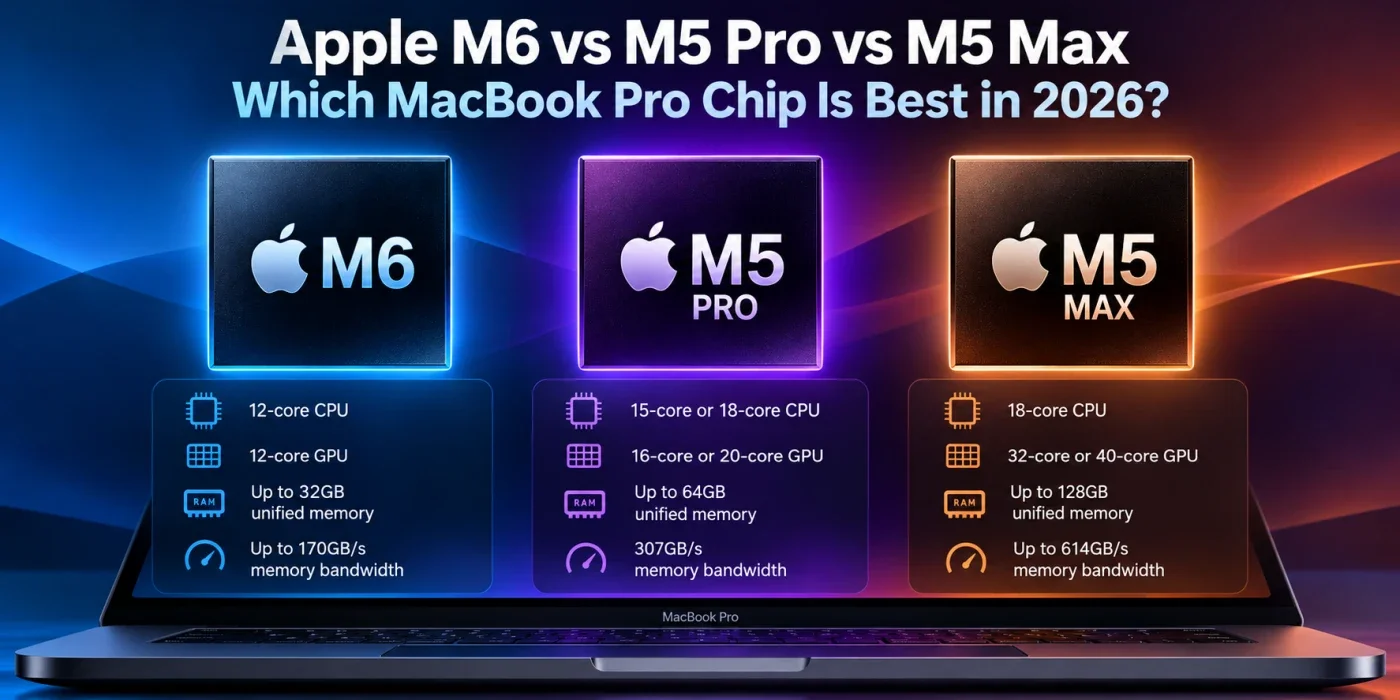
M6 vs M5 Pro vs M5 Max: Quick Comparison
Apple's published specifications reveal that these chips target different types of users rather than representing three directly interchangeable products.
Specification | Apple M6 | Apple M5 Pro | Apple M5 Max |
|---|---|---|---|
CPU cores | 12-core | 15-core or 18-core | 18-core |
GPU cores | 12-core | 16-core or 20-core | 32-core or 40-core |
Maximum unified memory | 32GB | 64GB | 128GB |
Memory bandwidth | Up to 170GB/s | 307GB/s | Up to 614GB/s |
Neural Engine | Dual 16-core | 16-core | 16-core |
Best suited for | General productivity, coding, AI | Professional development and creative work | Advanced graphics, AI and demanding professional workloads |
Specifications are based on Apple's published chip configurations. Actual performance depends on the selected configuration, application and workload.
The table highlights the biggest difference: M6 is the standard-tier option, M5 Pro is the professional middle ground, and M5 Max is designed for workloads that can take advantage of significantly more GPU resources and memory bandwidth.
1. Apple M6: The Best Choice for Everyday Power and Efficiency?
The M6 powers Apple's 14-inch MacBook Pro and brings a 12-core CPU, a 12-core GPU and a Dual 16-core Neural Engine.
Apple reports that the M6 delivers up to 30% faster graphics performance and up to 25% faster performance for on-device AI workloads compared with the standard M5 chip. These are Apple-reported comparisons against M5, not direct comparisons against M5 Pro or M5 Max.
What makes the M6 interesting?
Strong CPU performance: The M6 is designed to handle demanding applications, multitasking, development tools and creative software.
Improved AI capabilities: Neural Accelerators in the GPU and the Neural Engine help accelerate supported AI workloads, including local language-model processing and AI-powered image editing.
Efficient operation: Apple advertises up to 24 hours of battery life for the 14-inch MacBook Pro with M6, although actual battery life varies by usage.
Modern connectivity: The M6 MacBook Pro includes Wi-Fi 7 and Bluetooth 6.
Is the M6 good for software developers?
Yes. For web developers, students and many professional programmers, the M6 should be a capable machine.
It can handle workflows involving VS Code, React, Next.js, Node.js, databases, Docker-based development and multiple browser tabs. However, large container workloads, complex virtual machines and memory-intensive projects may benefit from configurations with more unified memory.
The M6 supports up to 32GB of unified memory. If your work involves several virtual machines, large local datasets or multiple memory-hungry applications, that limit is worth considering.
Best for: Students, web developers, general software engineers, content creators and users who want strong performance without paying for a maximum-tier professional chip.
2. Apple M5 Pro: The Sweet Spot for Professional Work
The M5 Pro is designed for users who regularly push their MacBook Pro beyond everyday productivity.
It features a 15-core or 18-core CPU, depending on configuration, and a 16-core or 20-core GPU. It also provides 307GB/s of memory bandwidth and supports up to 64GB of unified memory.
Those differences matter when applications need to process large amounts of data, work with complex projects or use the CPU and GPU simultaneously.
Why choose the M5 Pro over the M6?
The most important advantages are the M5 Pro's higher memory bandwidth, greater maximum memory capacity and additional GPU resources in its available configurations.
For example, a developer working with several containers, local databases, Android emulators and large codebases may benefit from the M5 Pro's memory options.
A photographer processing large RAW image collections or a video editor working with complex timelines may also find the higher-tier chip more suitable.
However, the M6's newer-generation CPU and architecture mean that the M5 Pro should not automatically be assumed to win every CPU-heavy task. A direct comparison requires benchmarks for the specific application.
Is the M5 Pro worth the extra cost?
It can be, particularly if you regularly run applications that benefit from additional CPU cores, GPU resources or memory bandwidth.
For users whose workflows are mostly browser-based or involve lightweight programming, the M6 may offer better value. For professionals who regularly encounter resource limitations, the M5 Pro is a more capable platform to consider.
Best for: Professional developers, photographers, software engineers working with large projects, and video editors who need a balance of CPU and GPU performance.
3. Apple M5 Max: Maximum Graphics and Memory Capability
The M5 Max is Apple's highest-tier option among these three chips. It features an 18-core CPU and is available with a 32-core or 40-core GPU.
Its biggest advantages are graphics resources, memory bandwidth and memory capacity.
Depending on the configuration, M5 Max offers 460GB/s or 614GB/s of memory bandwidth and supports up to 128GB of unified memory.
That additional capacity is especially useful for workloads that need to keep large datasets, textures, video frames or AI model parameters in memory.
What can the M5 Max do better?
Advanced video production: Complex high-resolution timelines, effects-heavy editing and demanding export workflows may benefit from its additional GPU and media-processing resources.
3D rendering: Applications that scale well across GPU cores can take advantage of the larger GPU configurations.
Local AI workloads: Running large models locally can require substantial memory capacity and bandwidth. The M5 Max offers significantly more headroom than the standard M6.
Large creative projects: Projects involving high-resolution assets, multiple applications and large working datasets may benefit from the additional memory capacity.
It's important to understand that more GPU cores do not guarantee faster performance in every application. Some workloads are primarily CPU-bound, while others depend on storage speed, software optimisation or specialised hardware acceleration.
The M5 Max also commands a premium price. If your applications cannot use its additional resources, you may pay for performance you rarely need.
Best for: Professional video editors, 3D artists, AI developers, visual-effects specialists and users working with large datasets or demanding GPU-intensive applications.
4. CPU Performance: Is the Newer M6 Faster?
A common mistake is assuming that a newer chip generation always outperforms an older chip from a higher product tier.
Apple's M6 has a 12-core CPU, while M5 Pro offers up to 18 cores and M5 Max has 18 cores. However, core count alone does not determine performance.
Single-threaded applications often benefit from fast individual cores. Multithreaded applications can distribute work across multiple cores, making additional cores valuable.
This means the M6 may be a strong choice for everyday responsiveness and many lightly threaded tasks, while the M5 Pro and M5 Max can offer advantages in workloads that scale across more cores.
For example:
Opening applications and browsing the web: all three chips should be capable.
Compiling large projects: results depend on compiler behaviour, project size and CPU configuration.
Running multiple demanding applications: available memory and sustained CPU performance become more important.
Rendering and scientific workloads: performance depends on how effectively the application uses CPU cores and other hardware.
There is no single winner for every CPU workload. Compare benchmarks from the applications you actually use before purchasing.
5. GPU Performance: M6 vs M5 Pro vs M5 Max
The GPU is one of the clearest reasons to consider a higher-tier Apple silicon chip.
The M6 has a 12-core GPU. The M5 Pro offers 16-core and 20-core configurations, while the M5 Max offers 32-core and 40-core GPUs.
More GPU resources can help with supported 3D rendering, visual effects, GPU-accelerated video processing and certain AI tasks.
Consider these examples:
Web development: A powerful GPU is rarely the main factor in a typical frontend or backend development workflow.
Photo editing: GPU acceleration can help with supported filters, effects and AI-powered adjustments.
Video editing: GPU resources can help with effects, colour processing and other accelerated operations.
3D design: GPU performance can be a major factor in rendering and viewport responsiveness.
Gaming: Performance depends on the game, graphics settings, resolution and macOS optimisation.
The M5 Max is the strongest option on paper for workloads that can effectively use its larger GPU. But it is not necessarily the most sensible purchase for someone who rarely performs GPU-intensive work.
6. AI Performance: Which Chip Is Better for Local AI?
AI workloads are becoming an increasingly important consideration when choosing a laptop.
Apple's M6 includes Neural Accelerators in its GPU and a Dual 16-core Neural Engine. M5 Pro and M5 Max also include Neural Accelerators and a 16-core Neural Engine.
However, comparing Neural Engine core counts alone does not provide a complete picture of AI performance. Different workloads use the CPU, GPU, Neural Engine and unified memory differently.
For developers experimenting with local language models, memory capacity is particularly important.
A model must fit into available memory alongside its runtime, context and other applications. Larger models and longer contexts can require substantially more memory. Quantisation can reduce memory requirements, but it also changes the model's numerical precision.
The M6's maximum 32GB unified memory may be enough for smaller local models and many AI-assisted development workflows.
The M5 Pro, with up to 64GB, offers more room for larger workloads. The M5 Max, with up to 128GB and substantially higher memory bandwidth, is the most flexible choice among these three for memory-intensive local AI work.
Still, buying a Max chip does not automatically make every AI task faster. Software support, model architecture and workload size all matter.
7. Memory Bandwidth: The Specification You Shouldn't Ignore
Memory bandwidth describes how much data a processor can transfer between unified memory and its processing units per second.
Apple's published figures are:
Chip | Memory bandwidth |
|---|---|
M6 | Up to 170GB/s |
M5 Pro | 307GB/s |
M5 Max | Up to 614GB/s |
Higher bandwidth can be valuable when the CPU and GPU need to access large amounts of data quickly.
This is particularly relevant to large video projects, GPU-heavy applications and some local AI workloads.
For everyday browsing, office applications and routine coding, however, the difference may not translate into a noticeable improvement in every task.
Memory capacity and bandwidth are also different. Capacity determines how much data can remain in memory; bandwidth affects how quickly data can move. Your workload determines which matters most.
8. Price Comparison: Which Chip Offers Better Value in India?
The right purchase is not necessarily the most powerful MacBook Pro. It is the machine that provides the performance you need at a price you can justify.
Apple's published Indian starting prices for the standard configurations are:
MacBook Pro configuration | Starting price in India |
|---|---|
14-inch MacBook Pro with M6 | ₹2,39,900 |
14-inch MacBook Pro with M5 Pro | ₹2,49,900 |
16-inch MacBook Pro with M5 Pro | ₹2,99,900 |
14-inch MacBook Pro with M5 Max | ₹3,99,900 |
16-inch MacBook Pro with M5 Max | ₹4,29,900 |
Prices are based on Apple's published starting prices and may change. Check the official Apple India store for current prices, education discounts and configuration options.
The price gap between M6 and M5 Pro may be relatively small at the entry level, making it worthwhile to compare memory, display size and storage before deciding.
The M5 Max, on the other hand, carries a much higher starting price. Its extra cost is easier to justify when your work depends on its GPU, memory capacity or bandwidth.
For students and developers, spending more on RAM or storage where possible may be more useful than choosing the highest-tier processor without a specific need.
9. Which MacBook Pro Should You Buy?
Here's a practical guide based on common workloads.
Your workload | Recommended chip | Why |
|---|---|---|
College and everyday productivity | M6 | Strong performance and efficiency |
Web development with React or Next.js | M6 or M5 Pro | Depends on memory and project complexity |
Backend development with Docker | M5 Pro for heavier workloads | More memory capacity and bandwidth |
Professional photo editing | M5 Pro | Strong balance of CPU and GPU resources |
Complex video editing | M5 Pro or M5 Max | Depends on effects, resolution and project complexity |
3D rendering and visual effects | M5 Max | Larger GPU configurations |
Large local AI models | M5 Max | Up to 128GB memory and high bandwidth |
Large-scale professional workloads | M5 Max | More headroom for demanding projects |
These are recommendations based on hardware capabilities, not guarantees of benchmark superiority. The best configuration depends on the applications you run.
10. Final Verdict: M6 vs M5 Pro vs M5 Max
The M6, M5 Pro and M5 Max are designed for different priorities.
Choose the M6 if you want a modern, powerful MacBook Pro for software development, everyday productivity, general creative work and supported AI tasks. It is the sensible starting point for many users.
Choose the M5 Pro if you need more memory, higher memory bandwidth and additional CPU or GPU resources for demanding professional workflows. It offers a strong middle ground between everyday performance and workstation-level capability.
Choose the M5 Max if you regularly work with GPU-intensive applications, large creative projects or memory-hungry AI workloads. Its additional resources can be valuable when your software takes advantage of them.
The key lesson is simple: the M6 is newer, but the M5 Pro and M5 Max belong to higher performance tiers. Don't choose solely by chip generation or core count. Consider memory requirements, application benchmarks, battery life and total cost.
For most students and web developers, the M6 is likely to be enough. For professionals whose workloads are limited by memory or graphics performance, the M5 Pro or M5 Max may be the better long-term investment.
Official sources
Apple: 14-inch MacBook Pro with M6
Prices and specifications should be rechecked against Apple's official store before publication.
FAQs
Is M6 better than M5 Pro?
Not in every workload. M6 is a newer standard-tier chip, while M5 Pro offers more CPU and GPU resources in its available configurations, higher memory bandwidth and support for more memory. The better option depends on the application.
Does M5 Max have more RAM than M6?
Yes. M5 Max supports up to 128GB of unified memory, while the standard M6 supports up to 32GB. M5 Pro sits between them, supporting up to 64GB.
Should I upgrade from M5 to M6?
If your current MacBook Pro meets your needs, upgrading may not be worthwhile solely for the newer chip. Compare actual application performance, connectivity and other features before spending money on an upgrade.
Which chip is best for running local AI models?
M5 Max offers the most memory capacity and bandwidth of these three chips, making it the most flexible choice for larger local models. The best configuration still depends on the model's memory requirements and software support.
Which Apple chip is best for coding in 2026?
The M6 should be sufficient for most web development, including React, Next.js and Node.js. Developers who use many Docker containers, virtual machines or large projects may benefit from an M5 Pro configuration with more memory.
Is M5 Max more powerful than M6?
For many GPU-intensive and memory-heavy workloads, M5 Max offers substantially more hardware resources. The M6 may still be competitive in some CPU-focused tasks, so application-specific benchmarks are important.
Was this article helpful?

Written By
TechorCoffeeContributing Writer
TechorCoffee is a technology reporter and software creator writing reviews and tutorials for TechOrCoffee.
Comments (0)
Leave a Comment
Read Next

Tue Apr 21 2026
Leaks & Rumors: Apple MacBook M6 with Touch Screen: My 2026 Leaks Expectations
As a tech journalist with 15+ years testing Apple gear, I break down the buzz around the Apple MacBook M6 with touch screen. Expect OLED touch displays, M6 chip leaps in AI tasks, and pricing from $1,099. I compare it to MacBook Air M6 and Pro M6, share my insights on battery life and workflows
Fri Jun 05 2026
MacBook Pro M6 & OLED Screen: Full 2026 Guide (WWDC 26)
Everything you need to know about the MacBook Pro M6 in 2026 — OLED display, touchscreen, M6 chip specs, release date, and whether it's worth the wait.
Fri Apr 03 2026
Leaks & Rumors: MacBook Neo vs MacBook Air M5: Which One Should You Buy ?
Apple launched two MacBooks in March 2026. The Neo starts at $599 with an A18 Pro chip great for light users. The Air M5 starts at $1,099 with M5, 16GB RAM, and Thunderbolt 4 built for serious work. One is a smart buy. The other is a smarter one.